Change Default Comment Color in Vim
How to fix unreadable blue comments on black background in Vim by changing syntax highlighting colors.
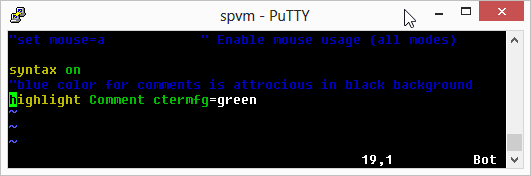
On Debian systems (and perhaps on other linux distros as well), the foreground color of comments is blue by default. This looks quite unreadable on black background, which is the case for most terminal windows.
As you can see, the above is quite unreadable. But the fix is quite simple. Let’s say you want to make all comments show in ‘green’ instead. Just add the following line to your ~/.vimrc (or /etc/vim/vimrc.local if you want to change it for everyone on your linux box):
highlight Comment ctermfg=greenNow the colors look far more readable.