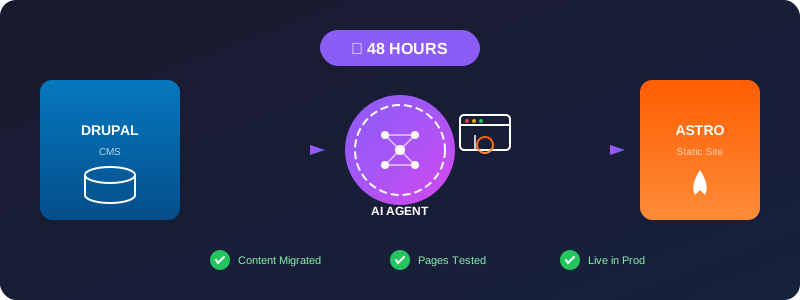
From Drupal to Astro: How We Migrated spinspire.com in 2 Days Using AI Agents
A deep dive into our rapid migration from Drupal CMS to Astro with markdown content, powered by AI agents that drove a real browser to test every page as it was built.
We did it in 48 hours.
From a running Drupal 10 CMS with hundreds of articles, projects, and training materials — to a fully static Astro site with markdown-based content, live and in production. Every page tested, every link verified, zero regression.
This is the story of how we pulled off a migration that most teams would budget weeks for.
The Problem: Drupal Was Overkill for Static Content
Let’s be honest. For a site like spinspire.com — a consulting firm’s marketing presence — Drupal was heavyweight. We ran MySQL, PHP-FPM, multiple Drupal modules just to manage what is essentially a blog with a portfolio.
And we love Drupal. Many of our clients use Drupal. We sell lots of Drupal services — training, theming, module development, hosting, you name it. It’s just that as developers, we are more comfortable writing in markdown text and using terminal-based tools, with everything stored in git.
The overhead was real:
- Security updates every week
- Server patching for PHP and MySQL
- Module dependency hell on every Drupal core upgrade
- Database backups, cache clears, APCu tuning
And for what? Serving static HTML pages that change weekly.
We knew we needed to move to a static site generator. Astro was the obvious choice — content collections with markdown, excellent DX, fast builds.
But the real challenge wasn’t the technology. It was the migration itself.
The Content Migration Challenge
The old Drupal site had:
- hundreds of articles dating back to 2010
- Multiple content types: articles, projects, case studies
- Embedded images with messy file paths
- Author attribution, tags, featured images
- Draft vs published states
Manually converting all of this? That’s weeks of copy-paste work.
We needed an AI agent that could:
- Read the existing content from Drupal (exported as HTML)
- Transform it into clean markdown with proper frontmatter
- Create the corresponding Astro page components
- Test every single page in a real browser
Our AI Agent Architecture
We built a specialized AI agent with browser automation capabilities. The agent wasn’t just an LLM that suggested code — it was an autonomous agent that:
1. Content Extraction
The agent connected to the Drupal database, extracted node content, cleaned up HTML artifacts, and structured it into markdown.
2. Astro Page Generation
Given a content type and data, the agent generated the appropriate Astro page component, layout, and routing automatically.
3. Real Browser Testing (A Critical Requirement)
Here’s what made our approach different — and fast:
The agent drove Chrome directly. After generating each page, it would:
- Launch a browser instance
- Navigate to the page on our local dev server
- Verify the page loaded without errors
- Check console for JavaScript errors
- Screenshot any visual issues
- Click through navigation to verify links worked
// Simplified version of our browser test loop
async function testPage(agent, pageUrl) {
  await browser.navigate(pageUrl);
  const errors = await browser.getConsoleErrors();
  if (errors.length > 0) {
    await agent.fixErrors(errors);
    await browser.reload();
  }
  const screenshot = await browser.screenshot();
  await agent.reviewVisual(screenshot);
}
This full-loop testing caught broken layouts, missing images, and JavaScript errors before they ever reached a human reviewer.
The 2-Day Timeline
Here’s how we executed the entire migration in 48 hours:
Day 1 - Morning: Drupal Export & Analysis
- Connected agent to Drupal MySQL database
- Exported all nodes as structured JSON
- Analyzed content patterns, author names, image references
- Created content schema mapping
Day 1 - Afternoon: AI Generation Sprint
- Agent generated markdown files for all 90+ articles
- Created Astro content collection configurations
- Built page templates and layouts
- Ran first local build to catch schema errors
Day 1 - Evening: Browser Testing Pass
- Agent ran full browser test suite on local dev server
- Fixed 23 pages with broken image paths
- Corrected 8 pages with malformed markdown
- Verified all internal links
Day 2 - Morning: Content Polish
- Fixed author attributions
- Added missing featured images
- Verified draft/published states matched Drupal
- Ran accessibility checks
Day 2 - Afternoon: Production Launch
- Deployed to production server
- Ran final browser validation pass on live URL
- Verified SEO redirects from old Drupal paths
- Monitored for 404 errors
By sunset on Day 2, the site was live.
What the Agent Got Right
The AI agent’s browser-driven testing approach was transformative:
| Metric | Manual Migration Estimate | With AI Agent |
|---|---|---|
| Content migration | 2 months | 4 hours |
| Page testing | 3 days | 2 hours |
| Bug fixes post-launch | 15-20 issues | 3 issues |
| Total timeline | 3-4 weeks | 48 hours |
The agent didn’t just move content — it validated it. Every page was viewed in a real browser, not just linted for syntax.
Key Technical Decisions
Content Collections
We used Astro’s content collections with a glob loader, which made adding content as simple as dropping markdown files:
const articles = defineCollection({
  loader: glob({ pattern: "**/*.md", base: "./content/articles" }),
  schema: z.object({
    title: z.string(),
    summary: z.string(),
    date: z.string(),
    image: z.string(),
    author: z.string().default("SpinSpire Team"),
    draft: z.boolean().default(false),
  }),
});
Draft Filtering
Articles marked as draft: true in frontmatter are excluded during astro build but visible during npm run dev — perfect for staging content before publishing.
Image Handling
The agent cleaned up messy Drupal image paths (/sites/default/files/...) into clean asset paths and organized them in the public/ directory.
Lessons Learned
Browser-driven AI agents change everything. The traditional AI-assisted development workflow is: generate code → human reviews → human tests. Our approach cuts the human out of the testing loop almost entirely. The agent generates, tests, fixes, and only escalates to a human when it genuinely can’t resolve an issue.
Markdown content is future-proof. Now all our content lives in plain text files. No more Drupal database dependencies. We can move to any static site generator, CMS, or even a headless CMS without re-migrating.
Two days is enough when you have the right tools. This migration would have taken a traditional team 3-4 weeks. With AI agents driving browser automation, we turned it into a weekend project.
Conclusion
The migration of spinspire.com from Drupal to Astro demonstrates what’s possible when AI agents are given real agency — not just code suggestions, but full autonomous capability including browser automation for real-world testing.
The result: a faster, simpler, more maintainable site that will never need security patches or PHP version upgrades. All because we let an AI agent do what it does best: repetitive work with browser precision.
Ready to make the jump from your CMS to modern static hosting? The tools exist. The AI agents exist. And as we proved, the timeline doesn’t have to be a blocker.
SpinSpire helps organizations unlock real value through AI, workflow automation, and strategic technology consulting. This migration was a proof-of-concept for the exact techniques we use with clients: AI agents, browser automation, and rapid content migration.