Using Colorbox to Show Your Node Images in Drupal 7
How to configure Colorbox module in Drupal 7 to display attached images in a lightbox overlay.
Drupal 6 is very good. But Drupal 7 is even better. Much cleaner user interface (UI), and much cleaner application programming interface (API) as well.
Today, I’m going to talk about Colobox integration in Drupal 7. With Colorbox in D7, you can show your attached images in a very user-friendly (and nice looking manner).
Let’s say you want to enhance the “Article” content type with Colorbox images (“Article” content type in D7 replaces “Story” content type from D6).
- Install D7 version of Colorbox on your D7 site from http://drupal.org/project/colorbox. Make sure you follow the instructions correctly for not just installing the module, but also the colorbox jQuery plugin (perhaps in sites/all/libraries).
- Goto Structure > Content Types > Article > Manage Fields, and add a new field named “Images” of field type “Image”
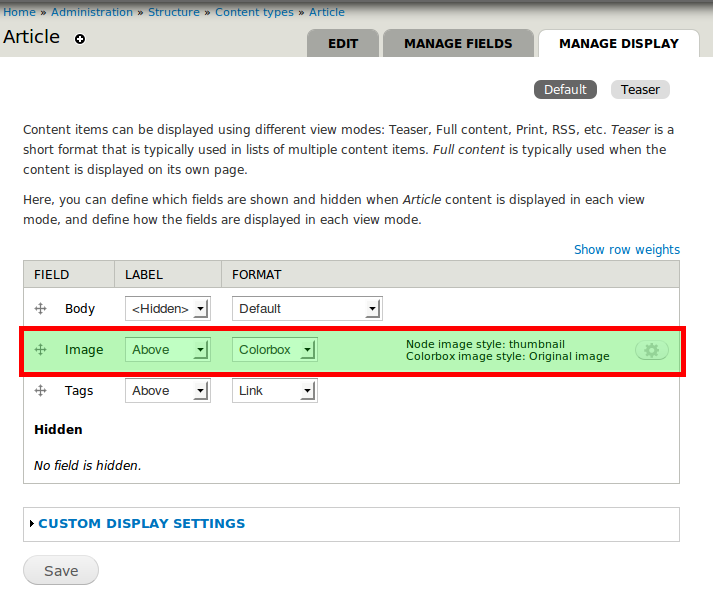
- Goto Structure > Content Types > Article > Manage Display, make sure “Images” field is not hidden and then change the display “Format” to “Colorbox”
- Click on the “gear” icon and set “Node image style” to “thumbnail” while leaving “Colorbox image style” to “Original”
See the attacscreenshot for how it looks after configuration. In fact, this site itself uses colorbox. So when you click on the screenshot thumbnail below, you’ll see colorbox in action.
That’s it. Now your Article nodes will start showing a list of images attached to them as thumbnails. And when you click the thumbnail a colorbox comes up with shows the original image and also lets you cycle through all the other attached images.